Flare Developer Hub MCP Server
The Flare Developer Hub MCP server exposes the full Flare documentation to any Model Context Protocol (MCP) compatible AI tool. Once connected, your AI assistant can search and fetch accurate, up-to-date Flare documentation directly — no copy-pasting, no outdated context.
The server is hosted at https://dev.flare.network/mcp
Available tools
The server exposes the following tools:
docs_search- full-text search across all Flare Developer Hub documentation pages.docs_fetch- fetch the full content of a specific Flare Developer Hub documentation page.
Setup
Quick connect
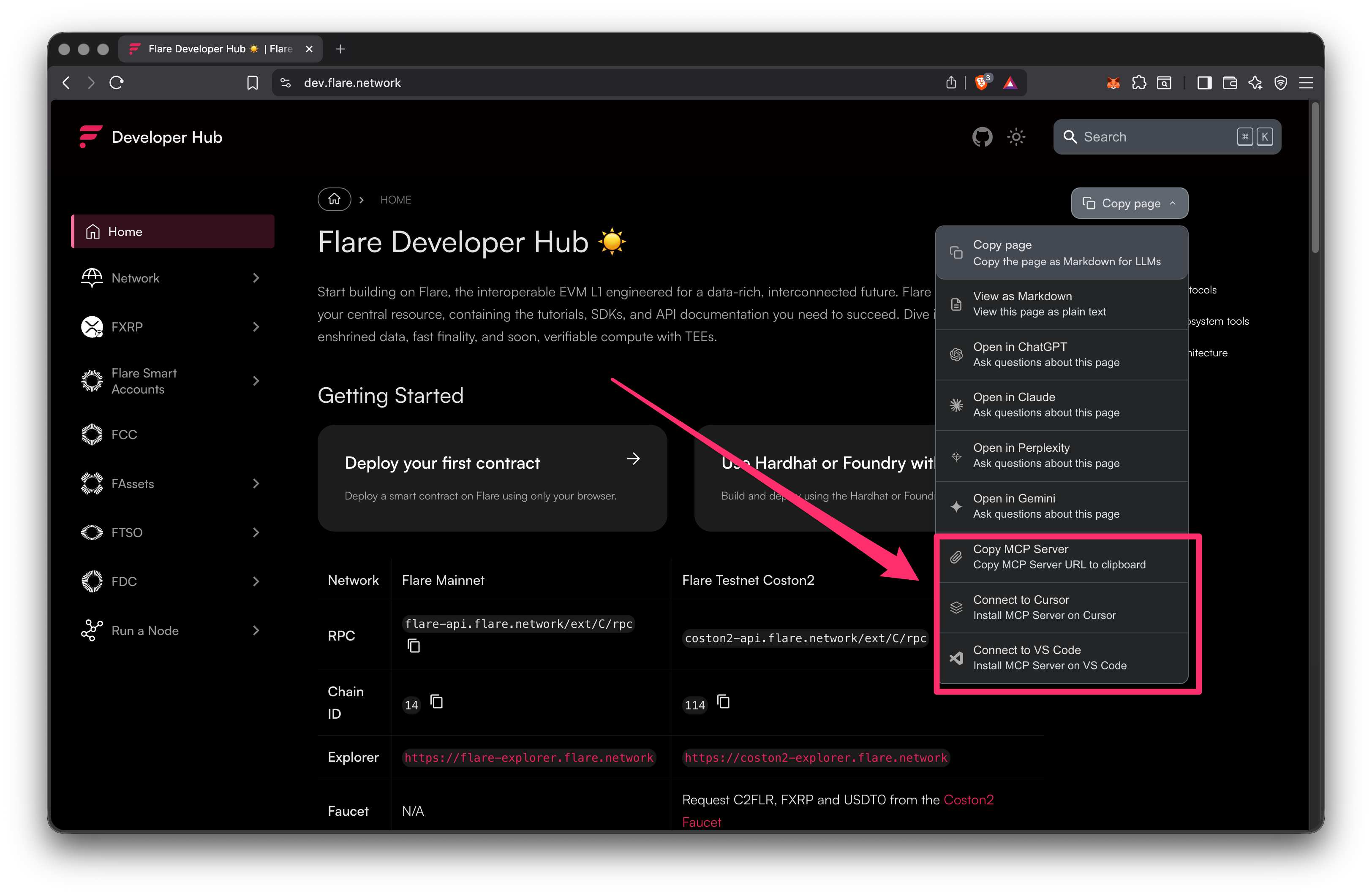
The fastest way to connect is directly from any page on the Flare Developer Hub. Click the Copy page button in the top-right corner and choose one of the MCP options from the dropdown:
- Copy MCP Server — copies the MCP server URL to your clipboard.
- Connect to Cursor — opens Cursor and installs the MCP server automatically.
- Connect to VS Code — opens VS Code and installs the MCP server automatically.
Claude Code
Run the following command to add the Flare MCP server to Claude Code:
claude mcp add --transport http flare-devhub https://dev.flare.network/mcp
To verify the server is connected:
claude mcp list
Cursor
Add it directly to your Cursor MCP config file at ~/.cursor/mcp.json:
{
  "mcpServers": {
    "flare-devhub": {
      "url": "https://dev.flare.network/mcp"
    }
  }
}
Other MCP-compatible tools
For any tool that supports the MCP Streamable HTTP transport, use the following endpoint:
https://dev.flare.network/mcp
Refer to your tool's documentation for instructions on adding a remote MCP server.
Example prompts
After connecting the server, your AI assistant can answer Flare-specific questions by searching and fetching documentation on demand.
Search the Flare docs and explain how FTSO price feeds workFetch the Flare FDC getting started page and show me how to request an EVMTransaction attestationSearch the Flare docs for FAssets minting and summarize the stepsLook up the Flare network RPC endpoints from the developer hubSearch the Flare docs and explain how Smart Accounts work for XRPL users
Video walkthrough
Explore Flare AI Skills for structured domain knowledge that works alongside the MCP server.