Flare Smart Accounts
The Flare Smart Accounts is an account abstraction that allows XRPL users to perform actions on the Flare chain without owning any FLR token.
Each XRPL address is assigned a unique smart account on the Flare chain, which it can control alone.
They do so through Payment transactions on the XRPL.
The Flare Smart Accounts are especially useful for interacting with the FAssets workflow.
Workflow
Flare Smart Accounts support two complementary flows for turning an XRPL Payment into actions on Flare.
Proof-based flow (payment reference)
- The XRPL user sends a
Paymenttransaction to the operator's XRPL address with a 32-byte instruction encoded as the payment reference. - The operator requests a
Paymentattestation from the Flare Data Connector (FDC) and submits it to theMasterAccountController. - The XRPL user's
PersonalAccountperforms the action encoded in the reference.
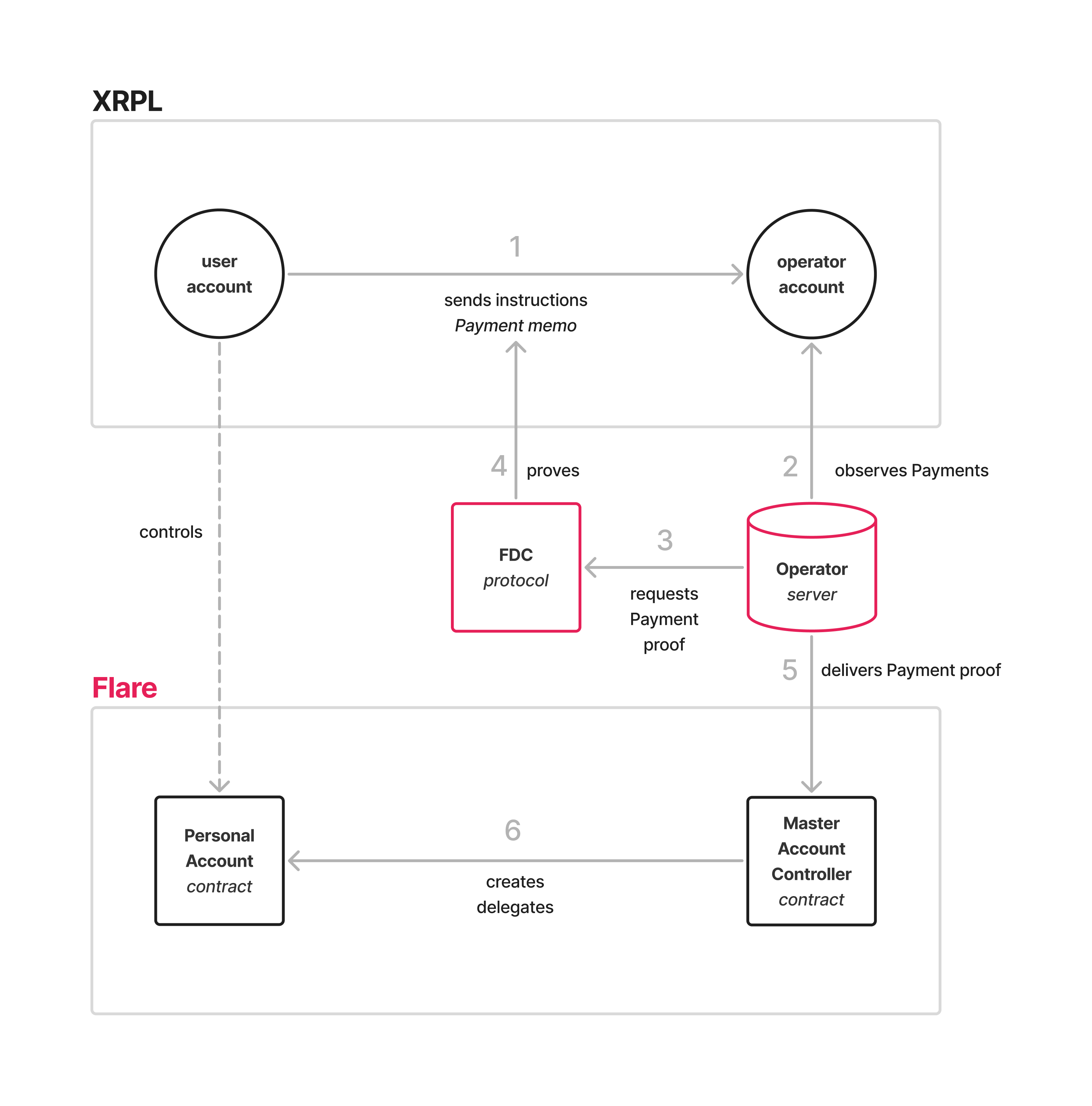
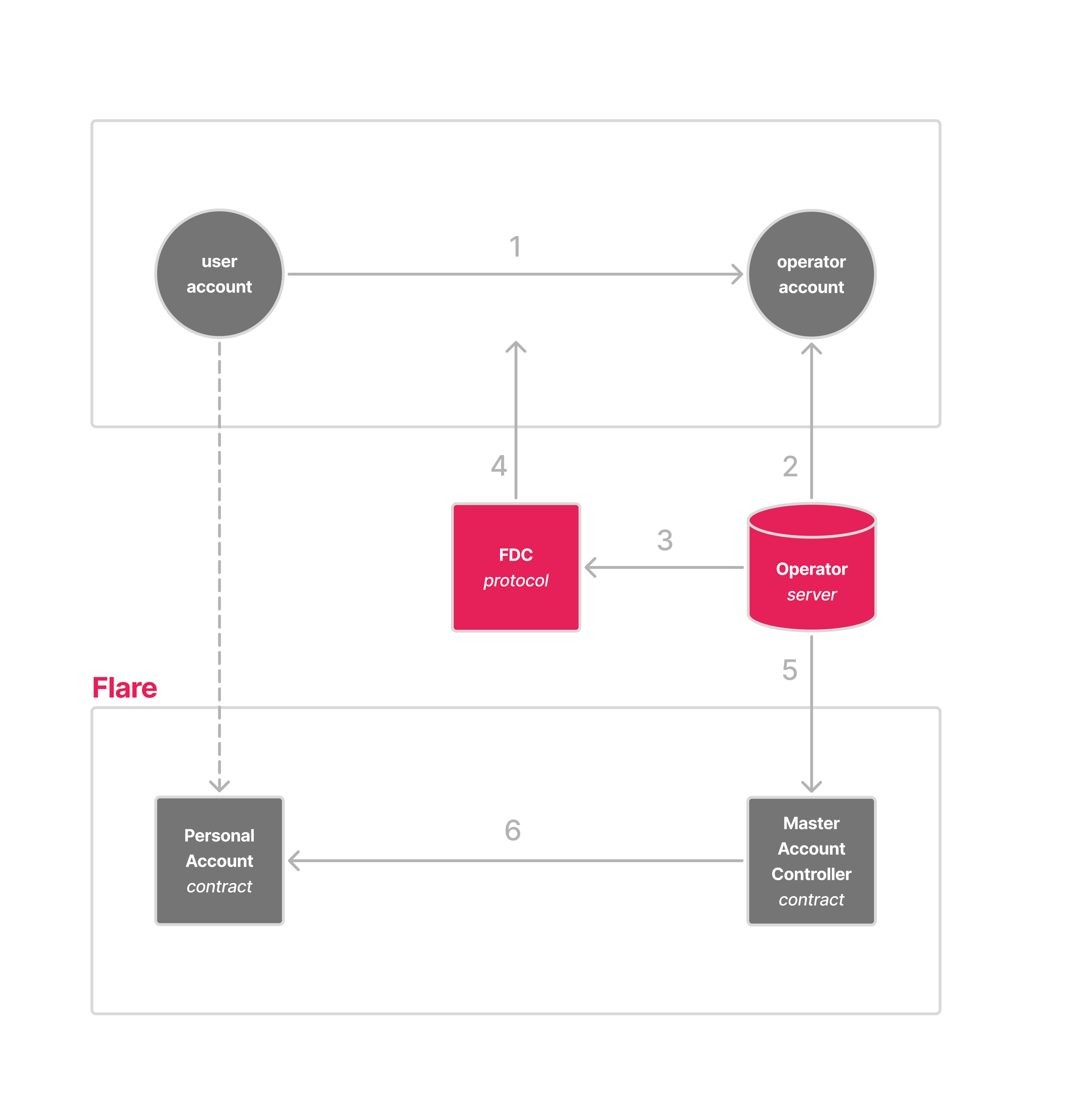
Proof-based flow: XRPL Payment (1) → operator backend (2) → FDC attestation
(3, 4) → MasterAccountController (5) → PersonalAccount (6).
Direct-minting (memo) flow
- The XRPL user sends a
Paymentto the FAssets Core Vault XRPL address that mints FXRP to the smart account (or with a memo instruction), as described in FAssets minting. - The FAssets
AssetManagermints FXRP to theMasterAccountControllerand calls back intohandleMintedFAssets. - The
MasterAccountControllerroutes the FAssets to the user'sPersonalAccount, optionally pays an executor fee, and dispatches any memo instruction.
Direct-minting flow: XRPL Payment to the Core Vault carrying a memo (1) →
executor observes and calls AssetManager.executeDirectMinting (2, 3) →
AssetManager mints FXRP and calls back into handleMintedFAssets (4) →
MasterAccountController forwards FXRP and dispatches the memo to the user's
PersonalAccount (5).
Instructions on XRPL
The Flare Smart Accounts allow XRPL users to perform actions on the Flare chain through instructions on the XRPL.
This is done through a Payment to an XRPL address, designated by the operator, a backend monitoring incoming transactions and interacting with the Flare chain.
The payment must transfer sufficient funds, as specified by the operator, and must include the proper payment reference (proof-based flow) or memo (direct-minting flow).
The payment reference is a bytes32 value.
The first byte is reserved for the instruction code.
The second byte is a wallet identifier.
This is a number assigned to wallet providers by the Flare Foundation, and should otherwise be 0.
The remaining 30 bytes are the parameters for the chosen instruction.
In practice, the payment reference should be prepared by a backend, through a web form.
The first, instruction code, byte is further subdivided into two half-bytes.
The first nibble is the instruction type.
This is either FXRP, Firelight, or Upshift (with corresponding type IDS 0, 1, and 2).
The second nibble is the instruction command; the available commands are different for each instruction type.
For the direct-minting flow, the memo carries a different layout; the first byte selects one of the memo opcodes listed below.
Table of instruction IDs and corresponding actions.
FXRP
Instructions for interacting with the FXRP token.
Type ID: 00.
| Command ID | Action | Description |
|---|---|---|
00 | collateralReservation | (Legacy CRT) Prefer FAssets minting. Reserve a value of lots of collateral in the agent vault, registered with the agentVaultId with the MasterAccountController contract. |
01 | transfer | Transfer a value (in drops) of FXRP to the recipientAddress. |
02 | redeem | Redeem a value of lots of FXRP. |
Firelight
Instructions for interacting with a Firelight-type vault.
Type ID: 01.
| Command ID | Action | Description |
|---|---|---|
00 | collateralReservationAndDeposit | (Legacy CRT) Prefer FAssets minting then deposit. Reserve a value of lots of collateral in the agent vault, registered with the agentVaultId with the MasterAccountController contract. After successful minting, deposit the FXRP into the Firelight type vault, registered with the vaultId with the MasterAccountController contract. |
01 | deposit | Deposit a value of FXRP into the Firelight type vault, registered with the vaultId with the MasterAccountController contract. |
02 | redeem | Start the withdrawal process for a value of vault shares (in drops) from the Firelight type vault, registered with the vaultId, with the MasterAccountController contract. |
03 | claimWithdraw | Withdraw the FXRP, requested in the value period, from the Firelight type vault, registered with the vaultId, with the MasterAccountController contract. |
Upshift
Instructions for interacting with an Upshift-type vault.
Type ID: 02.
| Command ID | Action | Description |
|---|---|---|
00 | collateralReservationAndDeposit | (Legacy CRT) Prefer FAssets minting then deposit. Reserve a value of lots of collateral in the agent vault, registered with the agentVaultId with the MasterAccountController contract. After successful minting, deposit the FXRP into the Upshift type vault, registered with the vaultId, with the MasterAccountController contract. |
01 | deposit | Deposit a value of FXRP into the Upshift type vault, registered with the vaultId with the MasterAccountController contract. |
02 | requestRedeem | Start the withdrawal process for a value of vault shares (in drops) from the Upshift type vault, registered with the vaultId with the MasterAccountController contract. |
03 | claim | Withdraw the FXRP requested for the value date (encoded as yyyymmdd) from the Upshift type vault, registered with the vaultId with the MasterAccountController contract. |
Memo opcodes (direct-minting flow)
The XRPL memo for the direct-minting flow selects one of the following opcodes in its first byte:
| Memo opcode | Action | Description |
|---|---|---|
0xFE | Custom Instruction | Carry keccak256(PackedUserOperation) in the memo; the bytes are delivered off-chain by an executor. See Custom Instruction. |
0xFF | Memo Field Custom Instruction | Carry the full ABI-encoded PackedUserOperation inline in the memo. See Memo Field Custom Instruction. |
0xE0 | Skip memo | Mark a target XRPL transaction's memo to be skipped on its next direct mint. Used to recover FXRP when executeDirectMintingWithData reverts — see Recovery after a failed mint. |
0xE1 | Fast-forward nonce | Advance the personal account's memo-instruction nonce when it is stuck after a partial or abandoned flow. |
0xE2 | Replace executor fee | Set a replacement executor fee for a stuck XRPL transaction. |
0xD0 | Pin executor | Pin a specific executor address to the personal account. |
0xD1 | Unpin executor | Unpin the executor from the personal account. |
The Custom Instruction Comparison covers when to choose 0xFE over 0xFF.
Dispatch on Flare
Proof-based flow
The operator monitors incoming transactions to the specified XRPL address.
Upon receiving a payment, it requests a Payment attestation from the FDC and submits the proof together with the user's XRPL address to the appropriate function on the MasterAccountController:
reserveCollateral— for command00of any instruction type. Takes the payment reference and XRPL transaction ID (no FDC proof needed at this stage, the user has only committed to mint).executeDepositAfterMinting— second leg of the Firelight/Upshift collateral-reservation-and-deposit instructions, after FAssets minting completes.executeInstruction— for all other reference-encoded instructions.
For the proof-bearing functions, the contract verifies the FDC proof and checks that:
- the receiving address matches one of the registered operator XRPL addresses,
- the source address matches the XRPL address passed to the function,
- the XRPL transaction ID has not already been used (replay protection via
usedTransactionIds).
The contract then resolves the XRPL user's PersonalAccount from the address mapping, deploying it via CREATE2 if it does not yet exist, and dispatches the instruction encoded in the payment reference.
Direct-minting flow
When the user mints FXRP directly to their smart account via FAssets minting, the FAssets AssetManager calls back into handleMintedFAssets on the MasterAccountController.
It enforces that the caller is the AssetManager, resolves (or deploys) the user's PersonalAccount, pays an executor fee out of the minted FAssets, forwards the remainder to the personal account, and dispatches any memo instruction.
Actions on Flare
The XRPL user's smart account performs the actions in the instructions.
This can be any of the instructions listed above — transferring FXRP to another address, redeeming FXRP, depositing it into a vault, and so on.
Minting FXRP itself uses FAssets minting (Core Vault payment), not a CRT Smart Accounts instruction.
Furthermore, custom instructions can be executed - arbitrary function calls on Flare, encoded as an EIP-4337 PackedUserOperation and replayed on-chain by the personal account.
The user operation can be committed to as a 32-byte hash with the bytes delivered to Flare by an off-chain executor (opcode 0xFE, see the Custom Instruction guide), or carried in the XRPL memo in full (opcode 0xFF, see the Memo Field Custom Instruction guide).
Authorization comes from the XRPL Payment signature itself; the on-chain check only validates the sender and nonce fields of the PackedUserOperation.
The Custom Instruction Comparison covers when to pick each.